
Not quite overload, but I’m still diving deep into the world of Javascript. The most important part in my eyes right now is syntax. Operators (math, comparison, etc.) were covered in a previous post, so I’ll cover other examples in this post.
Variables (think like algebra back in middle school)
  var x = 5
  var y = 6
  var z = x + y (I'll let you do the addition lol)
Functions: Allow you to call a function anywhere else in the code. A function name is also essentially a variable, but it points to function content instead of just a string, number, or boolean. Side note, you can also just assign a variable to a function (see example 2).
Example 1

  function bark(weight) {
    if (weight > 20) {
      return "Woof Woof";
    } else {
      return "meow";
    }
  }
Example 2

  var bark = function(weight) {
    if (weight > 20) {
      return "Woof Woof";
    } else {
      return "meow";
    }
  }
The functions above can both be called by typing bark(parameter). So, for example you can type bark(30) and it will run 30 through the function to return a string to the user. I’ll let you figure out what this simple function returns.
Loops: Loops allow you to run a block of code that evaluates to true until it evaluates to false. This is super useful to repetitive tasks (essentially allowing the computer to do the work for you). Three loops that I’ve learned so far are below:
For loops: Useful for when you know the end point for the loop.
Example below counts prints 0-100.

  for (var i = 0; i <=100; i++) {
  console.log(i);
  }
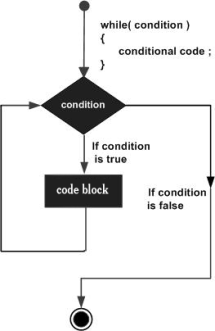
While loops: Useful when you don't know the end point for the loop.
For the purpose of this example, I'll just run the same loop as I
did above to show that either work in certain cases.

  var i = 0;
  while (i <= 100) {
    console.log(i);
    i++;
  }
Do while loops: Do while loops will run a statement prior to
evaluating the while loops. So this means that a code block will
always run before having the chance to become false. I'll include
a useful diagram to better explain this as well.

  var i = 0;
  do {
    console.log('Hello, World!');
    i++;
  }
  while (i < 5) {
    console.log('Goodbye, World');
  }
Diagrams (Left: while loop | Right: do while loop)

I don’t have time to include comparison statements, but there are simple comparison statements within the functions and loops above. Three simple comparison statements include:
- if/else
- if/else if/else
- switch
I would say the toughest part right now is retaining the structure for the syntax. This will probably be remembered with time, so I think I’ll focus on just writing a ton of different functions, loops, etc. in the coming days. Secondly, I am having trouble figuring out how to combine and apply the syntax to other scenarios outside of the examples I have learned. That will be another core focus in the next couple days so that I start to see the applications and power of Javascript (programming in general since these concepts apply to many other languages). Today, I’m going to meetup with my Uncle and grandparents so I won’t be able to spend much time programming. More to come on Thursday/Friday.
Also, huge props to all the sites that I used to get started learning this syntax. Here are a few of the resources I used: